TLDR
After a decade of tracking my time, I added a new category this year: vibing. Claude Code, Cowork, and Codex are not coding tools. They are ways to instruct your computer in plain language. They are Bitcoin in 2019-2020. They are a signal, not noise.
But they don’t do everything for you at one click. So to improve the outcome, at least for now, knowing these three things will help you get the most out of it:
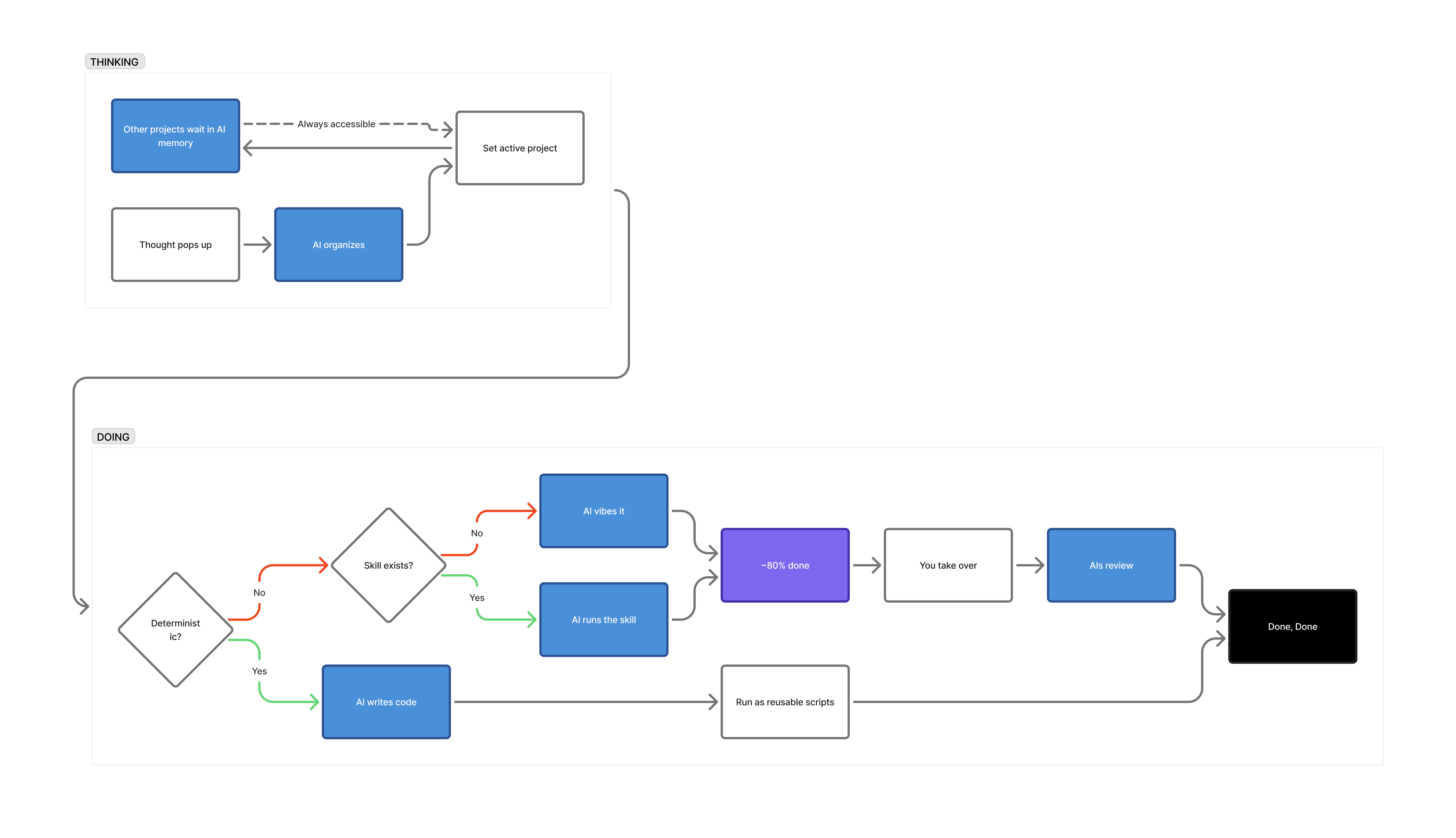
- Deterministic outcomes should be code, not prompts.
- The real lever is QA.
- After ~80%, take the wheel back. Let AIs take the role of reviewer from this point onwards.
──────────
Here’s how I process with AI:
──────────
Tsunami of transformation is coming to knowledge-work
I’ve tracked my time for about a decade. Started with Toggl, switched to WorkingHours. For years, every hour fit neatly into categories I’d already built. I thought the system was complete.
Early this year, I added one: vibing. I wrote an article on Cowork because I saw instantly the value in this simple change.
While I felt like I wanted to share a follow-up post because of the explosive AI related contents on any platform including LinkedIn, I didn’t attempt to auto my entire posting process. After all, for me writing is the crystallization of my thought process, not necessarily content making. My thoughts have crystallized, and these are the five things I’m now sure about:
Five things I’m now sure about:
1. Deterministic outcomes should be code, not prompts.
If the answer can be computed exactly, write a program. Vibe code it. Pope TV’s video offers an honest take: “Do you believe this? It’s a scam structure.” (https://youtu.be/jWWrEj10gRI?si=3UB9JGbtAng4yayy)
2. The real lever is an upfront QA.
If the model could give perfect answers, there’d be no reason to tolerate random outcomes. Vibing still drains time because you’re relying on probabilistic output.
For a multi-million-dollar project, making the specs extremely specific and extensive seems to do some magic. But that’s the tail wagging the dog. For everyday use, the whole point was to just get it done. What actually works: build a QA checklist at the start, then ask “did you pass every item?” before accepting output. That one step dramatically tightens results. (Even more so if you run QA in multiple passes.)
3. After ~80%, take the wheel back.
Maybe I haven’t found an antidote just yet — someone might have solved this problem, and if you’re the one, please be merciful and share the secret with us. I’ve tried many of the ideas floating around X and GitHub, and experimented with my own ideas as well.
But more vibing past 80% doesn’t improve output — it regresses it. Maybe not in a really small piece or programming, but if your output has some substance and involves judgements (documents or designs), I think this is the case.
The only workaround I’ve found is to stop vibing the whole scope and vibe at the more specific scope — paragraph or sentence level instead. But that too can be a folly — local optimization doesn’t guarantee the big picture holds together. So someone has to orchestrate. For now, that person is you.
My guess is this is not a bug, but a feature. Next-token prediction converges toward the most likely output. If your work is an outlier, “most likely” means your way of thinking regresses to the mean with vibing from this point onward. Take over. Finish it yourself. In a way, you become the QA-er — use AI only as a reviewer, not the one holding the pen.
4. Tools like Claude Code and Codex are not what you think.
When you hear “code,” you think programming. And if you’ve never been a programmer or developer, you think this isn’t your territory. It is. These are not programming tools. They are ways to talk to your computer and instruct it to do work. Presentations, documents, data analysis, file organization, research — anything a computer can do is the limit, not anything a human coder can do. That’s the shift.
For beginners, Claude is the most approachable. The Max 5x tier starts at $100/month. Also, it offers Cowork, which is more suitable for general tasks than Claude Code. If you’re not dispatching agents for massive scraping or building in parallel, that mostly covers it, especially with Cowork. I suggest $100 over $200 so you can subscribe to 1-2 other LLMs — GPT and Gemini, or Grok. Diversify your toolkit. If you use GPT, let it review Claude’s output. In my experience, GPT is extremely strict right now, especially Codex. Good for QA. (Everything can change, so I emphasize right now.)
5. Abstraction tolerance is what makes vibing work — and break.
It’s like tightening a bolt on a chair. Too much and the back is too stiff. Too little and the back is too loose. Finding the right balance is what lets you sit for hours through a vibing session without your back hurting.
When you let the model interpret loosely, output variability increases. But the AI picking up your intent and acting like an extension of your thoughts — an exoskeleton — that variability handled correctly is what makes the vibing feel good. Too much strictness and the friction feels annoying. I think most people using multiple LLMs already know this, which is why someone at OpenAI cheekily added “/codex: rescue” using the Codex plugin for Claude Code — published under OpenAI’s official GitHub org (https://github.com/openai/codex-plugin-cc).
I think many are doing the same thing. Create with Claude Code and then tighten that outcome with Codex.
──────────
Things currently on my mind.
I do think Obsidian with Claude has value — Karpathy’s recent post resonated (https://gist.github.com/karpathy/442a6bf555914893e9891c11519de94f), and I’ve been building something similar with a RAM/HDD architecture, indexing, pointers, and project load/unload logic underneath the workflow above. But I’ve been hesitant to write about it because I thought Obsidian might become a transitional artifact as AI gets more powerful.
The real question is which layer wins — the frontier model, the orchestration layer, or the OS + storage layer. The winning layer will absorb most interfaces in between. I was initially skeptical whether apps survive at all, but as long as humans are still in the loop, they will. The ones that last will be the ones so intuitive they feel like language — tools that extend how humans think — and also happen to work natively with AI agents.
Excel is one. It’s the thinking tool for the person. Its calculation engine, proprietary formulas, and recently added Python support are for AI (CSV as data type). Obsidian is the same story. Great frontend for humans. Great tool for AI agents — it’s basically a frontend for Markdown (MD as data type).
More in the next post.
 Insights to Decision
Leave a comment